Posts

Showing posts with the label eTrex 20

Google Ads

How to fix broken (disintegrated) Garmin eTrex 20 rubber buttons

Image
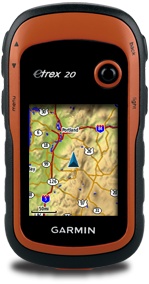
My Garmin eTrex20 is now about 6 years since I bought it. Since then I have using it and some times under utilizing it. But when time pass all things and materials will start to degrade. The buttons on the Garmin eTrex 20 have now disintegrated. Turned to rubber dust! The replacement casing is quite expensive and I found a cheaper way to fix it. However it will not be water proof anymore. Never the less I could still use it.

Do it yourself Garmin eTrex 20 carabiner clip

Image
From this part of the world (Malaysia), a carabiner clip costs me at about RM50. I felt that it was a bit expensive for a simple accessory to invest in. By using a cheap made in China normal carabiner clip (i got it from ACE hardware at Queensbay Mall) with 2 small cable ties, i am able to make my own Garmin eTrex20 carabinar clip. Below are my snapshots of my poor man Garmin eTrex20 carabiner clip.

Free routable maps for Garmin brand GPS devices

Image
This website provides free Garmin routable maps of the world. Select your desired map region and direct download the IMG file. The maps are generated from OpenStreetMap.

OSM Map On Garmin

Image
A comprehensive guide on how to manually convert OpenStreetMaps to Garmin IMG map format with different methods.

Free Garmin maps of the world

Image
A comprehensive list of websites to download free Garmin maps of the world generated by OpenStreetMaps.

GPS Tracklog : Garmin eTrex 20 review

Image
This is a very good review on Garmin eTrek 20 that really covers every aspect of the GPS device. This is definitely a recommended read before you buy this.

How to create Garmin custom map using MobAC

Image
This is a good step by step instructions on how you can create a Garmin custom map using MobAC written by thebikegeek.blogspot.com . Garmin custom map is a feature where you can use a normal JPEG image map captured from camera or scanned paper map as the map overlay on your Garmin devices.

Garmin eTrex Tips

Image
A good collection of tips and tricks for Garmin eTrex GPS unit. This is a must read website before you start to use your etrex unit.

Garmin eTrex 20 manuals

Image
A list of eTrex 20 user manuals for downloads.

How to get free topographic map into Garmin eTrex 20

Image
This post will guide you on how to download the SRTM3 data to create a topographic contour map to complement your existing Garmin street maps in your Garmin eTrex 20 GPS device. You will use it like an extra layer of map on top of your existing Garmin street map. If you have not got a street map and you are interested in getting the street map for your Garmin eTrex 20 device, please refer to  How to get free routable maps into Garmin eTrex 20 .  If you are interested to get street maps for Malaysia and Singapore, please refer to  How to install malfreemaps into Garmin eTrex 20 . Malfreemaps provides a very comprehensive map of Malaysia and Singapore, more comprehensive map than the free OpenStreetMaps. Note: The steps below only applicable for Windows OS and make sure you have Java installed into your system.

How to get free routable maps into Garmin eTrex 20

Image
This post will guide you how to get routable OpenStreetMap(OSM) maps into your Garmin eTrex 20 GPS unit. OSM maps are not comprehensive compare to other Garmin maps that you can purchase from Garmin but never the less they are free and you have the whole world to select for download. Note: I have tested this on my Garmin eTrex 20 and i am sure that this method also works for Garmin eTrex 30 units as well.

How to install malfreemaps into Garmin eTrex 20

Image
Malaysia and ASEAN Free Maps Project Forum (malfreemaps) provides a very comprehensive free Garmin map of Malaysia and Singapore for Garmin GPS devices. Malfreemaps works perfectly well on Garmin eTrex 20. I am sure this also applies on the Garmin eTrex 30 unit as well.